
For families without a home phone
Home alone, one tap from you.
Callyou turns the tablet, laptop, or computer you already have into a home phone. Your kids tap your name, and your phone rings. No phone number, no account, and no strangers.
- No account
- No ads
- Encrypted end to end
- Open source





01 · Why we made it
We don't have a home phone. When our kids are home alone, they still need to be able to reach us, and they don't have phones of their own.
We couldn't find an app that lets one of your own devices call another. So we made one.
The family behind Callyou
02 · Calling
They call. You answer.
A call from home rings on your phone, also when it is locked in your pocket. Answer it, and you are talking.
- On your phone. Full screen and with its own ringtone, on the lock screen too.
- On your wrist. An Apple Watch rings along with your iPhone, and a Wear OS watch can take calls of its own.
- On your computer. A Mac or a Linux computer rings from its menu bar or tray, with the window closed too.
03 · Minoes
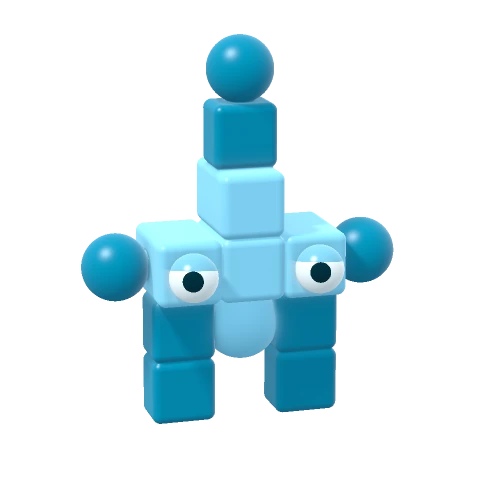
Every device gets a mino of its own.
A mino is drawn from its device's own key, so it never changes, and kids who can't read yet know who they are calling.

















04 · Only family
Nobody else can call.
Your devices pair once, at home. Scan the code on one with the other, check that both show the same mino, and accept. From then on they can call each other, and nobody else can call them.
- No phone number. There is nothing to give out, so nothing can leak.
- No contact lists, no chat, no ads. Just the devices you paired, and a button to call them.
- Grandma too. Pair the people you trust, and the kids can call them as well.
05 · Privacy
What happens at home stays at home.
Callyou doesn't need to know who you are. Your calls travel between your own devices, encrypted so that only those two can see or hear them.
No account
No sign-up, no email address, no phone number. Open the app, and it works.
Encrypted end to end
Every call is encrypted on one device and opened only on the other. Nobody in between can see or hear it, us included.
Straight between your devices
Your devices connect to each other directly whenever the network allows. When it doesn't, a relay passes the call along, still encrypted.
Kept on your devices
Who you paired and when you called stays on your own devices. There is no copy on our servers.
No ads, no tracking
No ads, no analytics, and no crash reports. This website has no cookies and no trackers either.
Servers that know little
A few servers help devices find each other and wake a sleeping phone. They never learn a name, and never see or hear a call.
06 · Open source
Nothing hidden. Every line is public.
Anyone can read how Callyou works, check that it keeps its promises, and help make it better. The apps, the engine they share, and the software on our servers are all open source.
See the source code- Apps for iPhone, iPad, Mac, Android, Linux, and the web
- Engine in Rust, shared by every app
- Servers that wake phones and relay calls
- Monitor for a Raspberry Pi
07 · Made with Callyou
Build your own devices that call.
Because Callyou is open source, anything with a camera, a microphone, or a speaker can become a device you call. Here is what people build with it.
Wall-E, a baby monitor
A Raspberry Pi with a night vision camera keeps an eye on the nursery. Call it from your phone to see and hear the baby. Your own camera and microphone stay off.
Build your ownMade something that calls?
A video phone on the kitchen wall, a door bell, a walkie-talkie for the tree house? Tell us about it, and we'll show it here.
Tell us about it
08 · Get Callyou
Put it on every device in the house.
Install Callyou on the devices the kids use and on the ones that should ring. Pair them once, and you're done.
-
iPhone and iPad
Calls ring on the lock screen, with their own ringtone.
-
Android
Phones and tablets, with or without Google's services.
-
Mac
Sits in the menu bar and rings with the window closed.
-
Apple Watch and Wear OS
The Apple Watch app comes with the iPhone app. A Wear OS watch gets Callyou from Google Play.
With the phone apps
-
Linux and Raspberry Pi
For your computer, or a home-built phone on the wall.
-
In your browser
On Windows, a Chromebook, or any computer, with nothing to install.